Every project targeting Microsoft ADO.NET Entity Framework requires creating a conceptual entity data model, a storage model describing physical data source and a mapping between these two. Each of these metadata resides in its own XML file with its own XML schema (CSDL, SSDL and MSL, respectively). Today I want to spend a few words about what possibilities you have regarding deployment of them.
Besides very simple scenarios I suppose that all Entity Framework models will be defined within standalone projects that are part of a bigger solution to preserve modularity and maintainability. Such a project contains one or more .edmx files created and edited in the Visual Studio EDM designer most of the time. An .edmx file is just a blend of CSDL, SSDL, and MSL content together with some data for diagramming support. This file is processed by EntityModelCodeGenerator tool which extracts corresponding .csdl, .ssdl and .msl files. Note that hand crafting these files is a perfectly valid way.
You then write path to the metadata files (.csdl, .ssdl and .msl) as part of your Entity Framework client connection string:
<connectionStrings>
<add name="NorthwindEntities"
connectionString="metadata=.\Northwind.csdl|.\Northwind.ssdl|.\Northwind.msl;provider=System.Data.SqlClient;provider connection string="Data Source=SERVER\SQL2000;Initial Catalog=Northwind;Integrated Security=True;MultipleActiveResultSets=False"" providerName="System.Data.EntityClient" />
</connectionStrings>
You have a couple of choices here (most of them have not been fully documented yet). An obvious choice is a physical file system path. The problem with this approach is that if you write a relative path, it is resolved against the current directory which is a very fragile thing. Take for example an ASP.NET web site/project -- the current directory is set up by the process hosting the site and it's usually anything what you don't expect. When you host your site in the IIS, most likely it's the system directory, while when you are debugging the site inside Visual Studio ASP.NET Development Server, it's C:\Program Files\Microsoft Visual Studio 9.0\Common7\IDE or something similar.
Better alternative in case of an ASP.NET web site is to use a well known tilde (~) prefix. This option is undocumented as far as I know. Internally the Entity Framework resolves the path using the HostingEnvironment.MapPath method so you may use any virtual path. For example let's suppose that we have a directory called models in the root virtual directory. Then the connection string could look like:
<connectionStrings>
<add name="NorthwindEntities"
connectionString="metadata=~\models\Northwind.csdl|~\models\Northwind.ssdl|~\models\Northwind.msl;provider=System.Data.SqlClient;provider connection string="Data Source=SERVER\SQL2000;Initial Catalog=Northwind;Integrated Security=True;MultipleActiveResultSets=False"" providerName="System.Data.EntityClient" />
</connectionStrings>
The last option is to embed the metadata as resources. Let's say that our Entity Framework models (.edmx files) are defined within a project called Models. We can automatically embed the generated .csdl, .ssdl and .msl files as resources by setting the Metadata Artifact Processing property of the conceptual entity model (this is what shows up when you open an .esmx file in the Visual Studio) to Embed in Output Assembly:
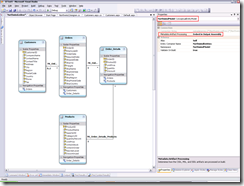
However, do not set Build Action in the properties of the .edmx file itself to Embeded Resource nor to Resource, just leave it as Entity Deploy:
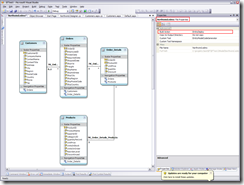
Of course, if you craft the files by hand, just embed them into the assembly as usual (Build Action to Embeded Resource for all of them).
Entity Framework client connection string recognizes the res:// prefix for locating metadata in resource manifests. Common syntax is res://assembly/resourcepath. In our case it could be:
<connectionStrings>
<add name="NorthwindEntities"
connectionString="metadata=res://Model/Northwind.csdl|res://Model/Northwind.ssdl|res://Model/Northwind.msl;provider=System.Data.SqlClient;provider connection string="Data Source=SERVER\SQL2000;Initial Catalog=Northwind;Integrated Security=True;MultipleActiveResultSets=False"" providerName="System.Data.EntityClient" />
</connectionStrings>
One special note: instead of a specific assembly name you may use an asterisk (*) to force the Entity Framework to search in all referenced assemblies which is quite useful when you have a single ASP.NET web site (not an ASP.NET web project) with .edmx files placed directly in the site -- then the ASP.NET compiler generates many assemblies with generated names so you don't know the name of the assembly your metadata will be part of in advance:
<connectionStrings>
<add name="NorthwindEntities"
connectionString="metadata=res://*/Northwind.csdl|res://*/Northwind.ssdl|res://*/Northwind.msl;provider=System.Data.SqlClient;provider connection string="Data Source=SERVER\SQL2000;Initial Catalog=Northwind;Integrated Security=True;MultipleActiveResultSets=False"" providerName="System.Data.EntityClient" />
</connectionStrings>
Unfortunately, the tilde (~) and res:// prefix for locating files given as either virtual paths or resources are not any kind of widely universal standard in the .NET framework. Entity Framework parses input and locates files on its own as many other frameworks/libraries and even parts of the .NET framework itself. I think that a standard describing common schemas (prefixes) and a standard component in the .NET framework handling it would be very useful.
